
US-Based Distributor
Wellington, Florida — serving US businesses, agencies & OEMs.
Send a Part Number
Search or send your list — obsolete & current GE Speedtronic, boards & controls.
24-Hour Quotes
US-based specialists reply within 24 hours.
Purchase Orders Welcome
POs accepted from qualified US buyers; cards too.
Secure & Protected • Purchase Orders Accepted

Genuine Products • Guaranteed Compatibility

Description
Cloud Ninjas' HP ProLiant DL380p Gen8 Specifications
Chassis
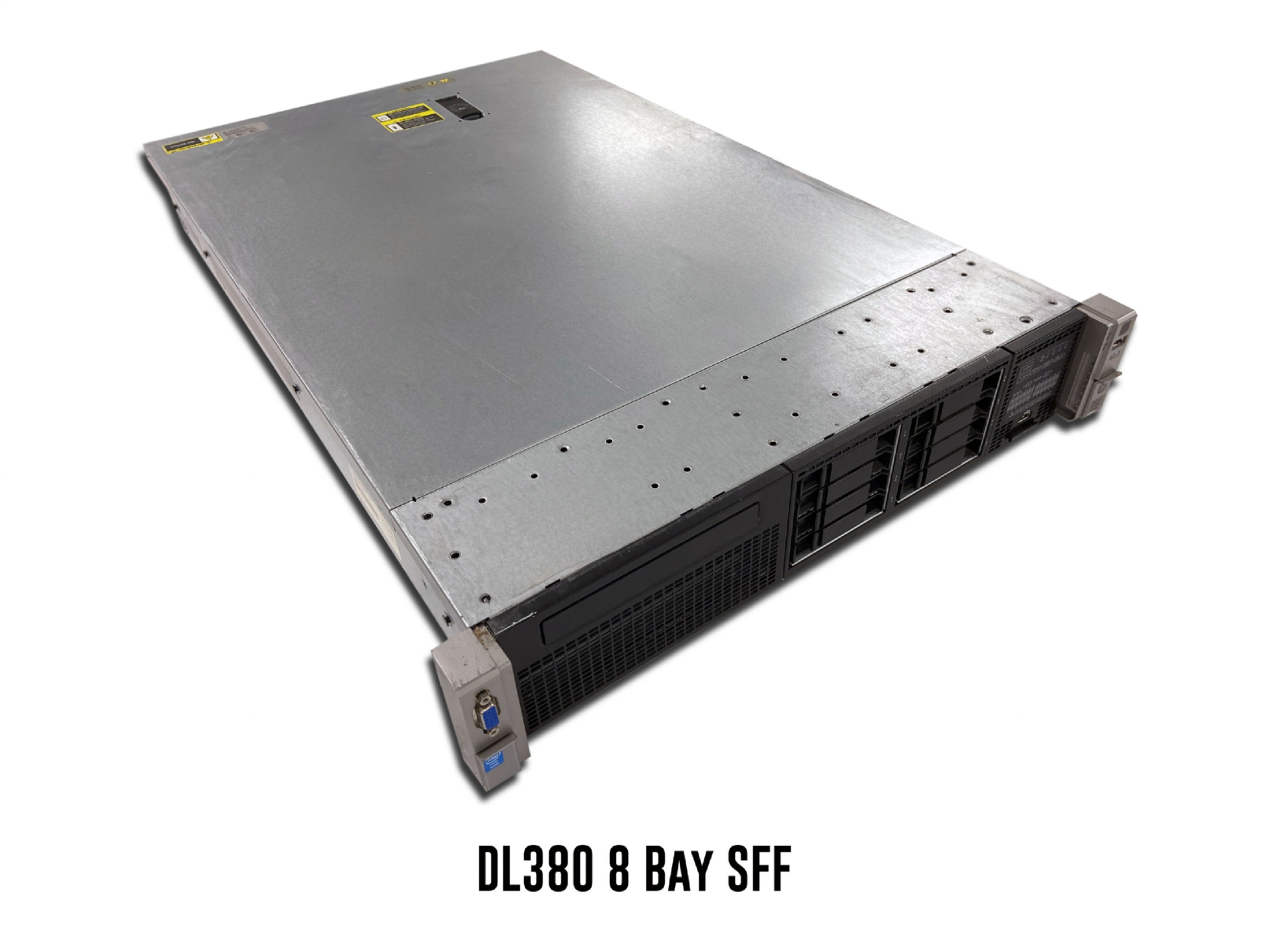
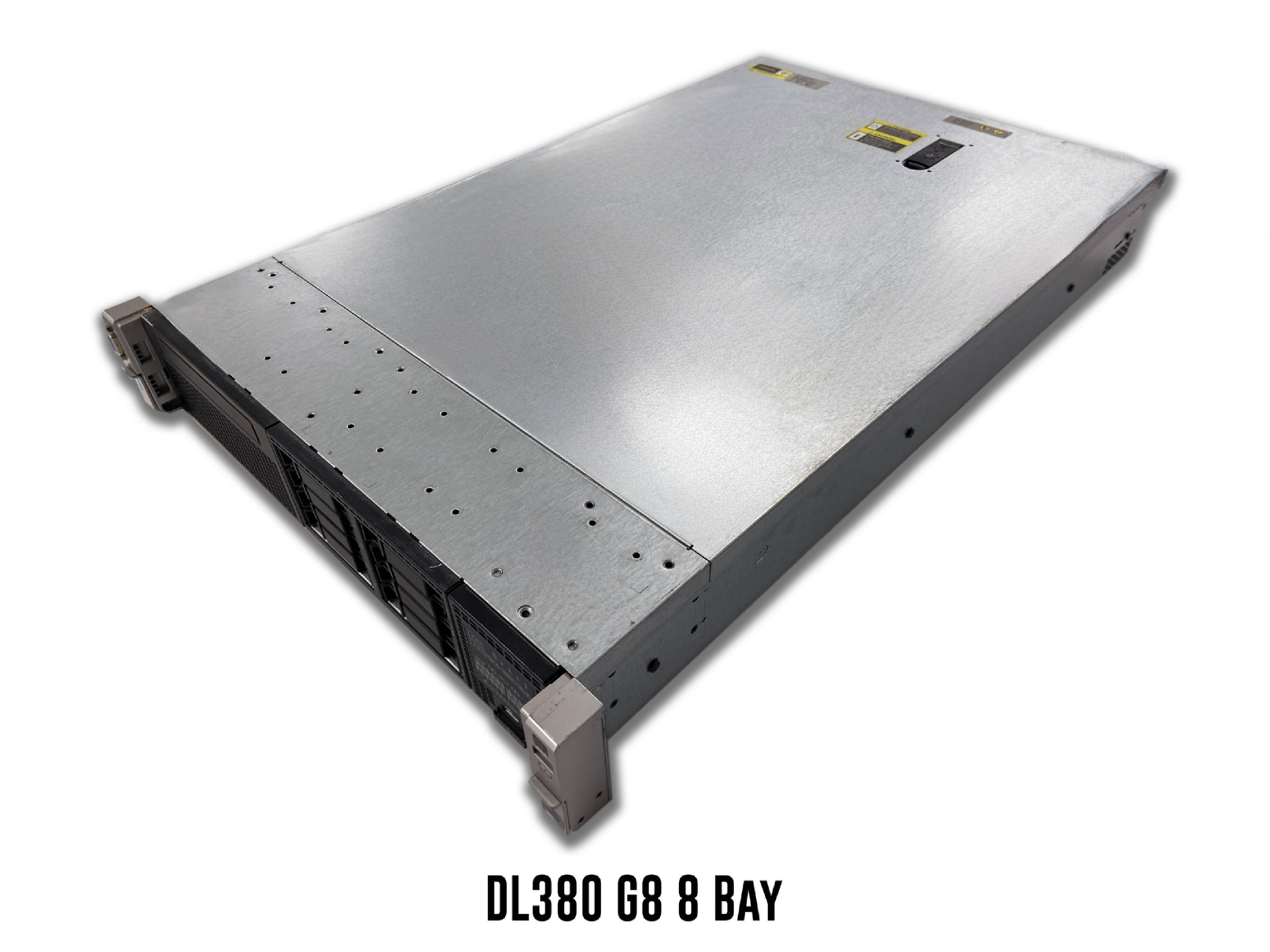
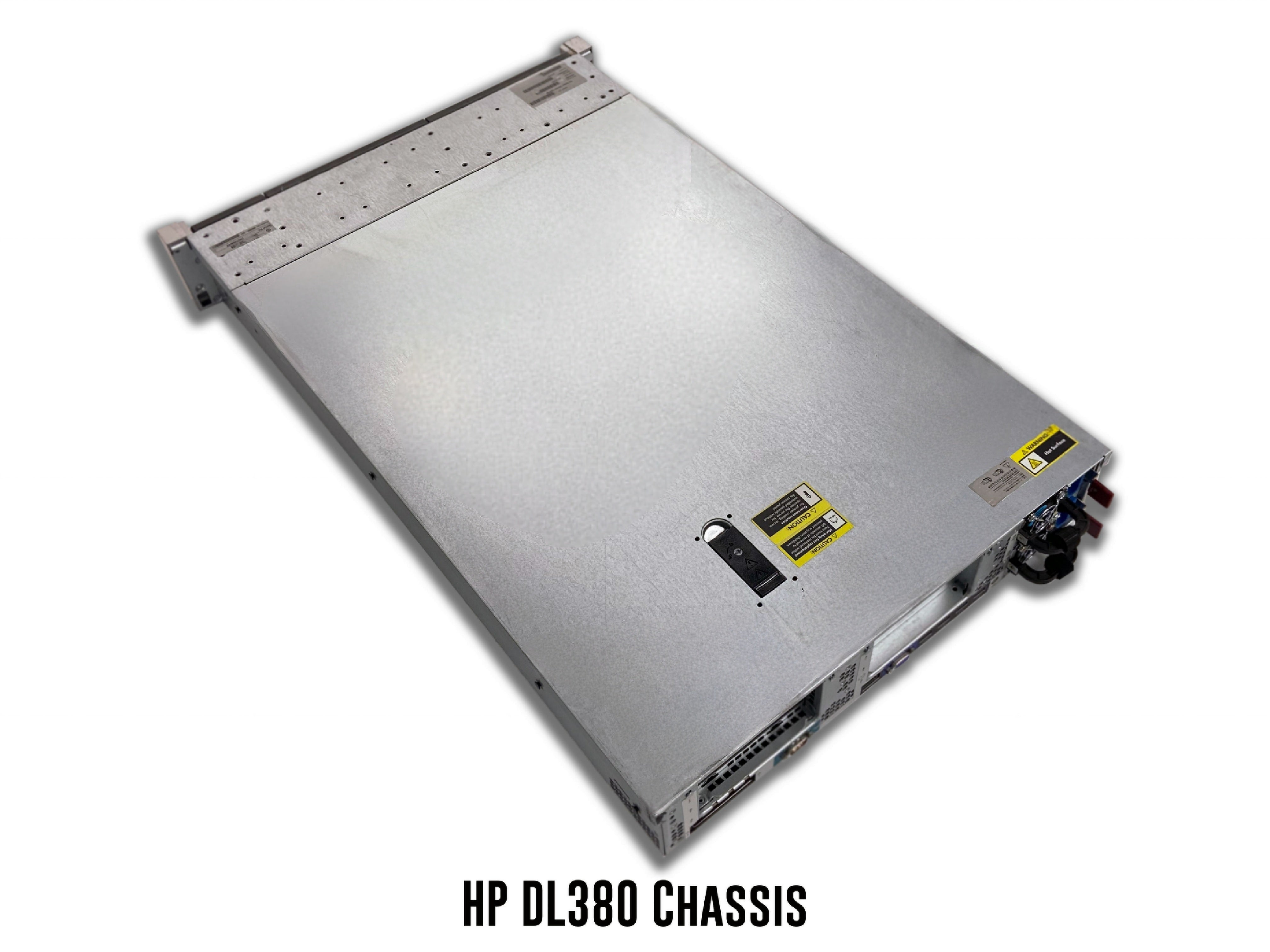
The HP ProLiant DL380p Gen8 server is a powerful, general-purpose server. This server is perfect for businesses of all sizes This 2U rackmount server has three chassis options to choose from: 12 Bay LFF 8 Bay SFF and 25 Bay SFF.
12 Bay LFF
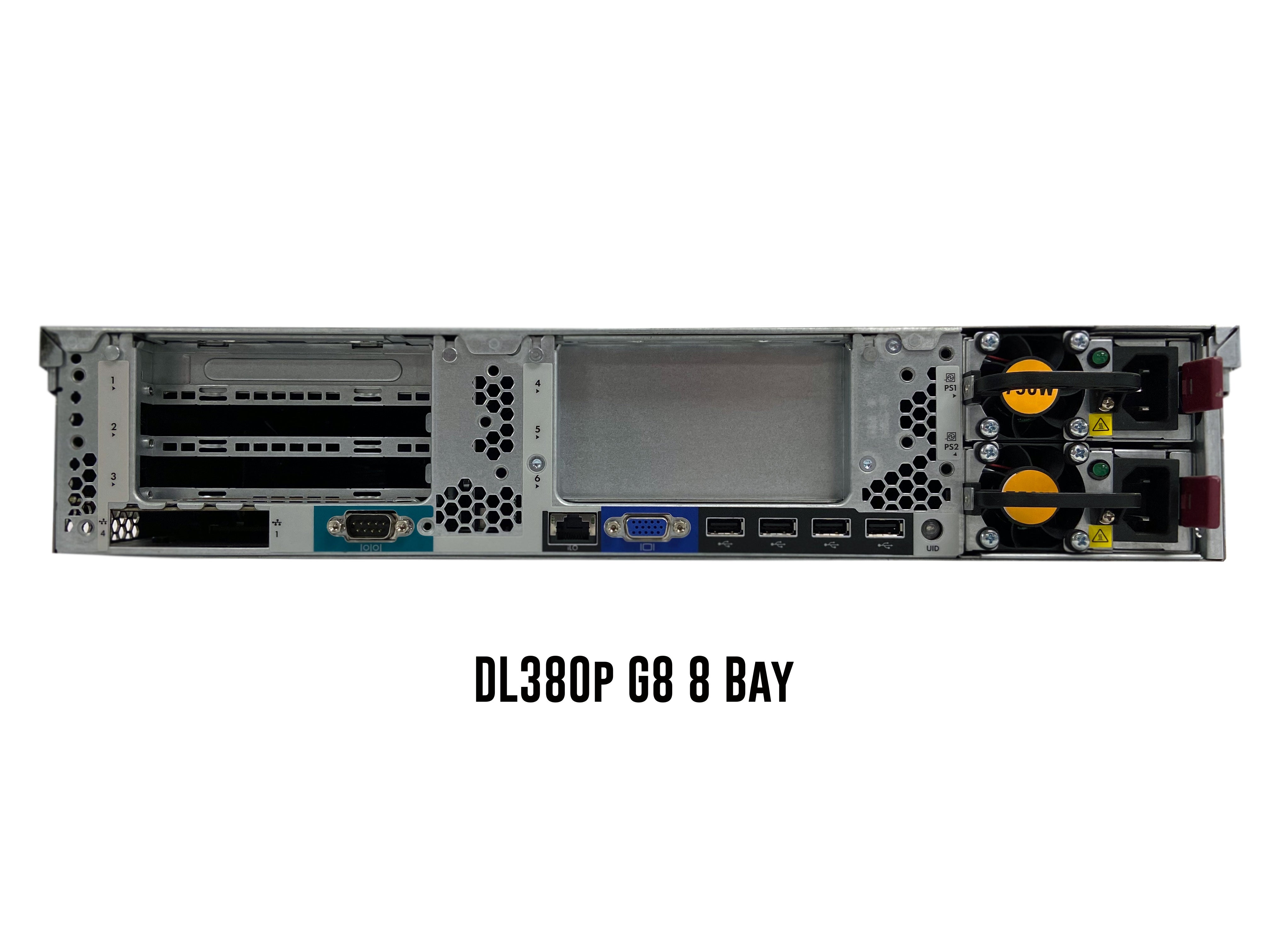
The 12 Bay LFF chassis for the HP ProLiant DL380p Gen8 can accept up to twelve 3.5" SAS/SATA drives. 2.5" hard drives and solid-state drives can be installed via a 2.5" to 3.5" drive converter. Drive bays for the DL380p are hot-swap, meaning that drives can be added or removed while the system is powered on. The rear of the 12 Bay LFF chassis includes a VGA port, a serial port, four type A USB ports, an iLO management port, a Flexible LOM (FLOM) slot, 3 full height PCIe 2.0 slots, 3 full height PCIe 3.0 slots, and two hot swap power supply bays.
8 Bay SFF
The 8 Bay SFF chassis for the ProLiant DL380p Gen8 can accept up to eight 2.5" SAS/SATA hard drives and/or solid-state drives. Drive bays for the 8 Bay SFF chassis are hot-swap. The rear of the 12 Bay LFF chassis includes a VGA port, a serial port, four type A USB ports, an iLO management port, a Flexible LOM (FLOM) slot, 3 full height PCIe 2.0 slots, 3 full height PCIe 3.0 slots, and two hot swap power supply bays.
25 Bay SFF
The DL380p Gen8's 10 Bay SFF chassis supports up to twenty-five 2.5" SAS/SATA hard drives and/or solid-state drives. Drive bays for the 25 Bay SFF chassis are hot-swap. The rear of the 12 Bay LFF chassis includes a VGA port, a serial port, four type A USB ports, an iLO management port, a Flexible LOM (FLOM) slot, 3 full height PCIe 2.0 slots, 3 full height PCIe 3.0 slots, and two hot swap power supply bays.
Processing Power
The HP ProLiant DL380p Gen8 server supports up to two Intel Xeon E5-2600 or E5-2600 v2 processors. Both CPU sockets are LGA2011 sockets. Up to 12 cores per processor are supported. That means that this system supports a max of 22 CPU cores. In order to use a v2 processor, you may need to update your BIOS.
Intel Xeon E5-2600 Series Processors
| CPU | Step Code | Cores | Frequency |
|---|---|---|---|
| E5-2603 | SR0LB | 4 | 1.80 GHz |
| E5-2609 | SR0LA | 4 | 2.40 GHz |
| E5-2620 | SR0KW | 6 | 2.00 GHz |
| E5-2630 | SR0KV | 6 | 2.30 GHz |
| E5-2630L | SR0KM | 6 | 2.00 GHz |
| E5-2637 | SR0LE | 2 | 3.00 GHz |
| E5-2640 | SR0KR | 6 | 2.50 GHz |
| E5-2643 | SR0L7 | 4 | 3.30 GHz |
| E5-2648L | SR0LX | 8 | 1.80 GHz |
| E5-2650 | SR0KQ | 8 | 2.00 GHz |
| E5-2650L | SR0KL | 8 | 1.80 GHz |
| E5-2658 | SR0LZ | 8 | 2.10 GHz |
| E5-2660 | SR0KK | 8 | 2.20 GHz |
| E5-2665 | SR0L1 | 8 | 2.40 GHz |
| E5-2667 | SR0KP | 6 | 2.90 GHz |
| E5-2670 | SR0KX | 8 | 2.60 GHz |
| E5-2680 | SR0KH | 8 | 2.70 GHz |
| E5-2687W | SR0KG | 8 | 3.10 GHz |
| E5-2690 | SR0L0 | 8 | 2.90 GHz |
Intel Xeon E5-2600 v2 Series Processors
| CPU | Step Code | Cores | Frequency |
|---|---|---|---|
| E5-2603v2 | SR1AY | 4 | 1.80 GHz |
| E5-2609v2 | SR1AX | 4 | 2.50 GHz |
| E5-2618Lv2 | SR1B8 | 6 | 2.00 GHz |
| E5-2620v2 | SR1AN | 6 | 2.10 GHz |
| E5-2628Lv2 | SR1AF | 8 | 1.90 GHz |
| E5-2630v2 | SR1AM | 6 | 2.60 GHz |
| E5-2630Lv2 | SR1AZ | 6 | 2.40 GHz |
| E5-2637v2 | SR1B7 | 4 | 3.50 GHz |
| E5-2640v2 | SR19Z | 8 | 2.00 GHz |
| E5-2643v2 | SR19X | 6 | 3.50 GHz |
| E5-2648Lv2 | SR1A2 | 10 | 1.90 GHz |
| E5-2650v2 | SR1A8 | 8 | 2.60 GHz |
| E5-2650Lv2 | SR19Y | 10 | 1.70 GHz |
| E5-2658v2 | SR1A0 | 10 | 2.40 GHz |
| E5-2660v2 | SR1AB | 10 | 2.20 GHz |
| E5-2667v2 | SR19W | 8 | 3.30 GHz |
| E5-2670v2 | SR1A7 | 10 | 2.50 GHz |
| E5-2680v2 | SR1A6 | 10 | 2.80 GHz |
| E5-2687Wv2 | SR19V | 8 | 3.40 GHz |
| E5-2690v2 | SR1A5 | 10 | 3.00 GHz |
| E5-2695v2 | SR1BA | 12 | 2.40 GHz |
| E5-2697v2 | SR19H | 12 | 2.70 GHz |
Memory
DIMM slots & Memory Channels
The HP ProLiant DL380p Gen8 server is a DDR3 based machine with 24 DIMM slots and 8 memory channels. Each channel consists of 3 DIMM slots.
Supported Memory Types
The DL380p Gen8 accepts both ECC Registered (RDIMM) and Load Reduced (LRDIMM) memory. It is important to not mix together memory types. For example, if you are installing LRDIMMs into your server, do not install any RDIMMs. If you are installing RDIMMs, do not install any LRDIMMs. Mixing memory types can lead to issues such as boot failure.
Supported Memory Capacities
Modules capacities of 4GB, 8GB, 16GB, 32GB, and 64GB. One thing to note is that 64GB modules are only available as LRDIMMs. With LRDIMMs, you can achieve an overall greater RAM capacity when compared to RDIMMs.
Max Configurations
With ECC Registered, the max RAM you can achieve is 768GB via 24 x 32GB DDR4 modules. With Load Reduced memory, 1.5TB can be reach via a configuration of 24 x 64GB DDR4 modules.
Supported Memory Speeds
The HP DL380p G8 supports module speeds of 1066MT/s, 1333MT/s, and 1866MT/s. 1866MT/s modules can be installed as well, but it will clock down to the fastest speed of the system. 1333MT/s is the fastest possible speed. The fastest speed that memory modules will run at depends on the processor that is installed. If you install a module with a speed that is faster than the maximum supported speed of the processor, that module will clock down to the max speed. For example, if the installed processor supports a max speed of 2133MT/s and you install a 2400MT/s module, the module will operate at 2133MT/s. It is also not recommend to mix together modules with different speeds. With mixing module speeds, the system will still function properly, but all modules will clock down to the speed of the slowest module.
Storage
The DL380p G8 chassis that you have will determine what form factor and number of drives you can install. With the 12 Bay LFF chassis, you can install up to twelve 3.5" SAS/SATA hard drives. 2.5" SAS/SATA HDDs and/or SSDs can be install into the 12 Bay LFF chassis via a 2.5" to 3.5" drive adapter. The 8 Bay SFF chassis can accept up to eight 2.5" SAS/SATA hard drives and/or solid-state drives. Lastly, the 25 Bay SFF chassis can accept up to twenty-five 2.5" hard drives or solid-state drives. All three chassis for the DL380p Gen8 are hot-swap, meaning the drives can be added or removed while the server is powered on.
Supported Drives (2.5")
| Type | Speeds | Max Capacity Per Drive |
|---|---|---|
| SAS | 10K or 15K | 2.4TB |
| SATA | 7.2K | 2TB |
| SSD (SAS & SATA) | 3GB/s or 6GB/s | 7.68TB |
Supported Drives (3.5")
| Type | Speeds | Max Capacity Per Drive |
|---|---|---|
| SAS | 7.2K, 10K, 15K | 16TB |
| SATA | 7.2K | 14TB |
| SSD (SAS & SATA) | 3GB/s or 6GB/s | 7.68TB |
Power Supplies
Power Supplies Overview
There are three power supply options for the DL380p Gen8: 460W, 750W, and 1200W. Each power supply option is hot-swap, which means that PSUs can be added or removed from the server while it is running, as long as one power supply remains plugged in. There are two power supply bays on the rear of each chassis option. If you install two power supplies, the wattages and voltages of the units must be matching. All power supply options for the DL380p Gen8 are great options, but the one that is best for you depends on your application. For low end applications, 460W power supplies are a great option. For higher end applications, 750W or 1200W will work just fine.
Storage Controllers
| RAID Options | RAID Levels | Cache | Drive Speeds | PCIe Generation | RAID Hardware |
|---|---|---|---|---|---|
| Smart Array B140i Software | 0, 1, 5, 10 | None | 6 Gb/s SATA | N/A | Software |
| H220 Host Bus Adapter | Passthrough | None | 6Gb/s SAS | PCIe 3.0 | Hardware |
| H221 Host Bus Adapter | Passthrough | None | 6Gb/s SAS | PCIe 3.0 | Hardware |
| H222 Host Bus Adapter | Passthrough | None | 6Gb/s SAS | PCIe 3.0 | Hardware |
| Smart Array P222/512 | 0, 1, 1 ADM, 5, 6, 10, 50, 60 | 512MB FBWC | 6 Gb/s SATA | PCIe 3.0 | Hardware |
| Smart Array P421/1GB | 0, 1, 5, 6, 10, 50, 60 | 1GB FBWC | 3Gb/s SATA 6Gb/s SAS |
PCIe 3.0 | Hardware |
| Smart Array P421/2GB | 0, 1, 5, 6, 10, 50, 60 | 2GB FBWC | 3Gb/s SATA 6Gb/s SAS |
PCIe 3.0 | Hardware |
| Smart Array P430/2GB | 1, 1 ADM, 5, 6, 10, 10 ADM, 50, 60 | 2GB FBWC | 6Gb/s SAS/SATA 12Gb/s SAS |
PCIe 3.0 | Hardware |
| Smart Array P430/4GB | 1, 1 ADM, 5, 6, 10, 10 ADM, 50, 60 | 2GB FBWC | 6Gb/s SAS/SATA 12Gb/s SAS |
PCIe 3.0 | Hardware |
| Smart Array P431/2GB | 0, 1, 1 ADM, 5, 6, 10, 10 ADM, 50, 60 | 2GB FBWC | 6Gb/s SAS/SATA 12 Gb/s SAS |
PCIe 3.0 | Hardware |
| Smart Array P431/4GB | 0, 1, 1 ADM, 5, 6, 10, 10 ADM, 50, 60 | 4GB FBWC | 6Gb/s SAS/SATA 12 Gb/s SAS |
PCIe 3.0 | Hardware |
| Smart Array P822/2GB | 0, 1, 5, 6, 10, 50, 60 | 2GB FBWC | 1.5Gb/s SAS 3Gb/s SAS/SATA 6Gb/s SAS/SATA |
PCIe 3.0 | Hardware |
Network Interface Card Options
The HP ProLiant DL380p Gen8 has a dedicated FlexibleLom (FLOM) slot in the rear of the system. This FLOM slot allows you to install cards with up to four ports. If you want additional networking capabilities in addition to the built in network ports and an FLOM card, you can also install PCIe network cards. FLOM and PCIe network cards are available with a variety of different speeds and port types. There are cards with port interfaces of RJ45, SFP, SFP+, SFP28, QSFP, and QSFP28. There are also speed options of 1GbE, 10GbE, 25GbE, 40GbE, and 100GbE. The number of ports, network speeds, and port interfaces that are best for you are entirely based on your applications. Unfortunately, there is no RJ45 ethernet ports built into the server itself.
FlexibleLOM (FLOM) Network Cards
| HP Ethernet 640FLR-SFP28 Dual Port 2 x 10/25GbE SFP28 Network Adapter |
| HP Ethernet 562FLR-SFP+ Dual Port 2 x 10GbE SFP+ Network Adapter |
| HP Ethernet 561FLR-T Dual Port 2 x 10GbE RJ45 Network Adapter |
| HP Ethernet 560FLR-SFP+ Dual Port 2 x 10GbE SFP+ Network Adapter |
| HP FlexFabric 556FLR-T Dual Port 2 x 10GbE RJ45 Network Adapter |
| HP FlexFabric 556FLR-SFP+ Dual Port 2 x 10GbE SFP+ Network Adapter |
| HP Ethernet 546FLR-SFP+ Dual Port 2 x 10GbE SFP+ Network Adapter |
| HP FlexFabric 536FLR-T Quad Port 4 x 10GbE RJ45 Network Adapter |
| HP FlexFabric 534FLR-SFP+ Dual Port 2 x 10GbE SFP+ Network Adapter |
| HP FlexFabric 533FLR-T Dual Port 2 x 10GbE RJ45 Network Adapter |
| HP Ethernet 366FLR Quad Port 4 x 1GbE RJ45 Network Adapter |
| HP Ethernet 331FLR Quad Port 4 x 1GbE RJ45 Network Adapter |
PCIe Network Cards
| HP Ethernet 331T Quad Port 4 x 1GbE RJ45 PCIe Network Adapter |
| HP Ethernet 361T Dual Port 2 x 1GbE RJ45 PCIe Network Adapter |
| HP Ethernet 332T Dual Port 2 x 1GbE RJ45 PCIe Network Adapter |
| HP Ethernet 366T Quad Port 4 x 1GbE RJ45 PCIe Network Adapter |
| HP Ethernet 562SFP+ Dual Port 2 x 10GbE SFP+ PCIe Network Adapter |
| HP Ethernet 561T Dual Port 2 x 10GbE RJ45 PCIe Network Adapter |
| HP Ethernet 560SFP+ Dual Port 2 x 10GbE SFP+ PCIe Network Adapter |
| HP Ethernet 557SFP+ Dual Port 2 x 10GbE SFP+ PCIe Network Adapter |
| HP Ethernet 546SFP+ Dual Port 2 x 10GbE SFP+ PCIe Network Adapter |
| HP Ethernet 530SFP+ Dual Port 2 x 10GbE SFP+ PCIe Network Adapter |
| HP Ethernet 530T Dual Port 2 x 10GbE RJ45 PCIe Network Adapter |
| HP Ethernet 620QSFP28 Single Port 1 x 10/25GbE QSFP28 PCIe Network Adapter |
| HP Ethernet 640SFP28 Dual Port 2 x 10/25GbE SFP28 PCIe Network Adapter |
| QLogic InfiniBand 4X QDR PCIe 2.0 Dual Port 2 x 10/40GbE HCA |
| HP InfiniBand FDR 545QSFP Dual Port 2 x 10/40GbE SFP PCIe Network Adapter |
| HP InfiniBand FDR/Ethernet 544+QSFP Dual Port 2 x 10/40GbE QSFP PCIe Network Adapter |
| HP InfiniBand FDR/Ethernet 544+FLR-QSFP Dual Port 2 x 10/40GbE QSFP PCIe Network Adapter |
| HP InfiniBand QDR/Ethernet 544+FLR-QSFP Dual Port 2 x 10GbE QSFP PCIe Network Adapter |
| HP InfiniBand EDR/Ethernet 840QSFP28 Single Port 1 x 100GbE QSFP28 PCIe Network Adapter |
| HP InfiniBand EDR/Ethernet 840QSFP28 Dual Port 2 x 100GbE QSFP28 PCIe Network Adapter |
| HP InfiniBand Single Port 1 x 100GbE OP101 QSFP28 x8 PCIe 3.0 with Intel Omni-PathArchitecture Network Adapter |
| HP InfiniBand Single Port 1 x 100GbE OP101 QSFP28 x16 PCIe 3.0 with Intel Omni-PathArchitecture Network Adapter |
Systems Management Solutions
For server management, the HP ProLiant DL380p Gen8 server utilizes Integrated Lights-Out 4 (iLO 4). The iLO can be accessed via the integrated iLO port on the rear of the DL380p Gen8. iLO features include: Active Health System Logs, Agentless Management, Deployment and Provisioning, Embedded Remote Support, iLO Federation Management, Integrated Management Log, Integrated Remote Console, Power Consumption and Power Settings, Power Management, Server Health Monitoring, User Access, and Virtual Media. The iLO has two license types: standard and advanced. A standard license is more limited than the advanced license. The main difference between the two licenses is that an advanced license allows you to use remote console and media functions.
Supported Operating Systems:
The HP ProLiant DL380p Gen8 Server supports a wide variety of operating systems which ranges from different distributions of Linux, VMware, and Windows Server. The operating systems include, but are not limited to:
- ⦿ Red Hat Enterprise Linux 6.3 and later
- ⦿ SUSE Linux Enterprise Server 11 SP2 and later
- ⦿ VMware ESXi 5.0 U2 and later
- ⦿ VMware ESXi 5.1 U1 and later
- ⦿ Windows Server 2008 R1 SP2/R2 SP1 and later
Related Products — You May Also Need
US-Based Distributor
Wellington, Florida — serving US businesses, agencies & OEMs.
Send a Part Number
Search or send your list — obsolete & current GE Speedtronic, boards & controls.
24-Hour Quotes
US-based specialists reply within 24 hours.
Purchase Orders Welcome
POs accepted from qualified US buyers; cards too.
Product
We always aim for make sure our customers love our products, but if you do need to return an order, we’re happy to help. Just email us directly and we’ll take you through the process.
Other
You can contact us through our contact page! We will be happy to assist you.
Any question?
If we still haven't answered your question, you can contact us below and we will get back to you as soon as possible.
WhatsApp +1 (305) 809-0110
info@alotechsolutions.com
Send a message
info@alotechsolutions.com


